
Decision Routing
Decision Routing automatically evaluates what you type and determines the best destination before sending—without requiring you to manually switch tools or remember hotkeys for each channel.
When you press Return in the summon window, SpotAsk asks a lightweight intent classification model whether the question should stay inside SpotAsk for an in-app answer or dispatch to an external web tool (ChatGPT, Perplexity), native macOS app, or local CLI agent.
Decision Routing only determines dispatch destination: it does not replace your configured chat model, and it does not record conversation history in local logs.
Opens the External Ask page in SpotAsk. If SpotAsk is not installed this link does nothing — open it by hand instead: SpotAsk menu bar icon → Settings... → External Ask, or press ⌘ + , to open Settings. Direct link: spotask://settings/external-ask
Video Demonstration
Video: One question, three destinations—decision routing demonstrated on real app footage (28s): an in-app answer, a web route notice, and a local agent confirmation card with confidence score. Download / Watch HD Video (1080p MP4)
Quick Setup & Recommended Engines
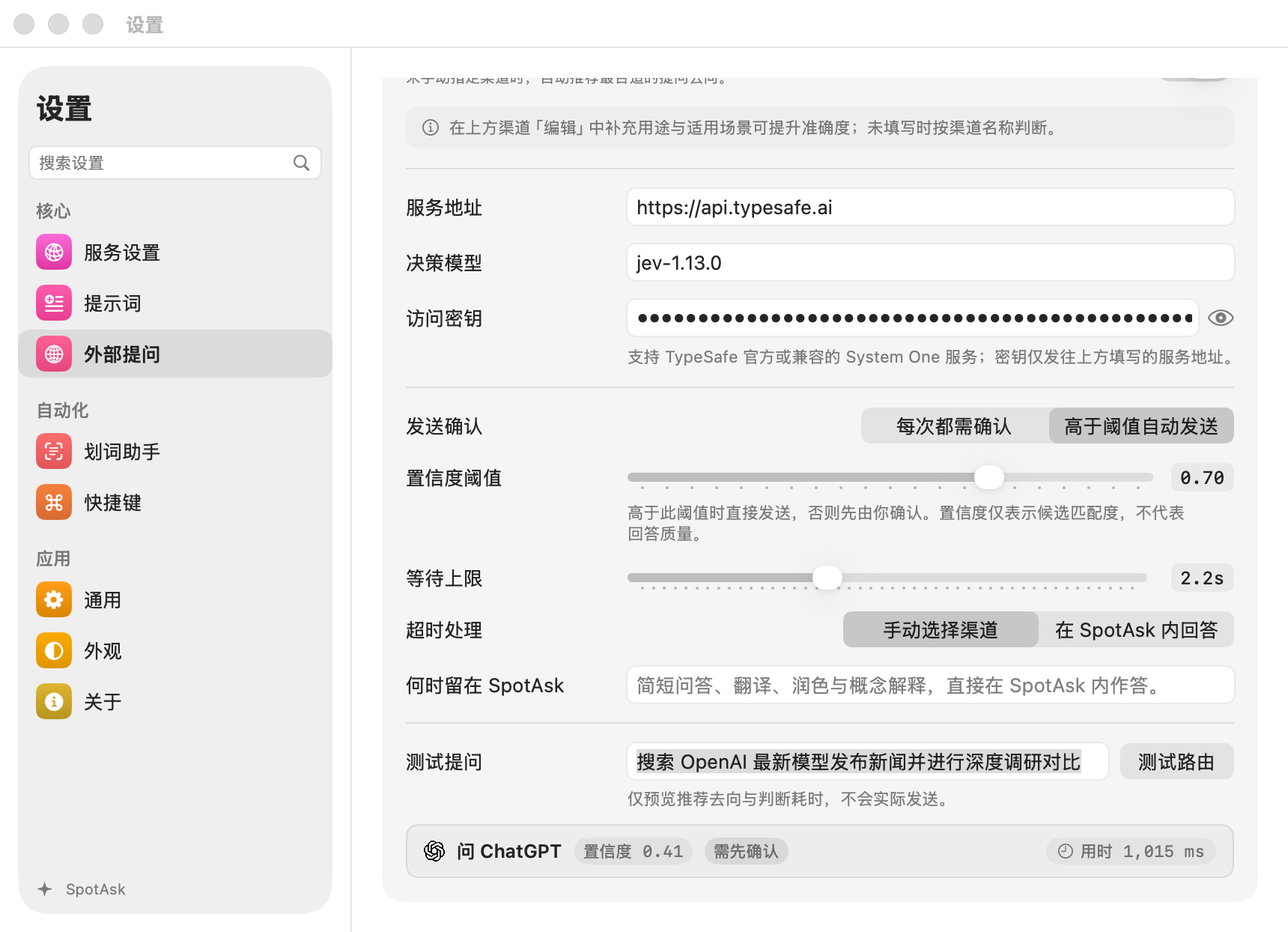
Open Settings > External Ask, scroll to the Decision Routing section, and turn on Enable automatic routing.
SpotAsk supports two distinct decision protocols: System One (jev) and OpenAI Decisions. Each engine independently maintains its own Service address, Decision model, and Access key. Switching between engines preserves your credentials and settings on both sides.
Once configured, click Test question in Settings to verify connectivity, latency, and routing recommendations before relying on them live.
Setup A: TypeSafe Official (Recommended)
Default endpoints and models are pre-filled out of the box. Simply provide your TypeSafe API key:
| Field | Recommended Value | Notes |
|---|---|---|
| Service address | https://api.typesafe.ai | Official TypeSafe classification endpoint |
| Decision model | jev-1.13.0 | Lightweight System One decision model |
| Access key | Your TypeSafe API key | Required; no remote requests are sent without a key |
Setup B: OpenRouter
Use OpenRouter to access the hosted System One classifier:
| Field | Recommended Value | Notes |
|---|---|---|
| Service address | https://openrouter.ai/api | SpotAsk automatically appends /v1/systemone |
| Decision model | typesafe/jev-1.13 | Pin typesafe/jev-1.13 or use dynamic ~typesafe/jev-latest |
| Access key | Your OpenRouter API key | Uses your OpenRouter account balance |
OpenRouter Base URL
Enter only the base address https://openrouter.ai/api. Do not paste a /chat/completions endpoint URL.
Setup C: OpenAI Decisions
Select OpenAI Decisions in the segmented engine picker. This calls the OpenAI Decisions API (POST /v1/decisions):
| Field | Recommended Value | Notes |
|---|---|---|
| Service address | https://api.openai.com | Official address or custom compatible proxy (always uses /v1/decisions) |
| Decision model | gpt-6-luna | OpenAI Decisions intent classifier |
| Access key | Your OpenAI API key | Required for official address; optional for custom local proxies |
Distinct API Protocol
OpenAI Decisions is a dedicated classification endpoint, not standard Chat Completions. OpenAI does not host the jev / System One model.
Interaction & Keyboard Shortcuts
Inline Confirmation Card
When automatic routing evaluates a query on Return, an inline card appears directly above the input composer showing the recommended target and confidence score:
- Press ↩: Dispatches immediately to the recommended destination.
- Press Tab or Arrow Keys: Cycles through candidate destinations.
- Press Esc: Cancels the recommendation and preserves your input draft.
Threshold Auto-Send
When Auto-send above confidence threshold is enabled:
- In-app destination: High-confidence queries answer immediately inside SpotAsk without prompting.
- External channels: A brief 0.8-second countdown notice appears before opening the target platform (press
Returnto send instantly, orEscto cancel).
Per-Conversation Toolbar Toggle
The chat window titlebar features a dedicated Smart Routing toggle icon (default shortcut ⌘ + ⇧ + R).
When you need to stay focused entirely on in-app Q&A for a task, you can pause automatic routing for the active conversation with one keypress. New conversations automatically reset routing to enabled. You can hide this toggle icon in Settings > External Ask.
Channel Hints & Fine-Tuning
Decision Routing passes channel names to the decision model. You can enhance accuracy by editing channels in Settings > External Ask:
- What it does & When to use: Provide natural language descriptions (e.g., "Live web research for news and stock prices" or "Terminal git automation").
- Always confirm first: Force an inline confirmation card for high-risk channels (such as executing Terminal scripts), regardless of confidence score.
Security & Reliability Boundaries
- Strict HTTPS Enforcement: Remote decision services strictly require HTTPS (loopback
localhost/127.0.0.1debugging is permitted over HTTP). Redirects across origins or from HTTPS to HTTP are blocked before question text leaves your Mac. - Attachment Exclusion: Attaching images or files automatically bypasses Decision Routing and keeps the conversation inside SpotAsk. Your attachments are never uploaded to external decision endpoints.
- Stale Recommendation Cancellation: Editing composer text, modifying attachments, or switching presets silently cancels any active recommendation or 0.8-second countdown, preventing accidental launches.
- Timeout Protection: The default decision timeout is 2 seconds (configurable from 0.5s to 5s). Network stalls or endpoint errors fall back smoothly to manual channel selection or in-app answering without freezing the summon window.
Frequently Asked Questions
Does Decision Routing use up expensive model tokens?
No. Decision models like jev-1.13.0 and gpt-6-luna are specialized classifiers designed for rapid intent evaluation. Each evaluation consumes only a few dozen tokens with sub-second latency and minimal cost.
Is my question text stored or used for training?
SpotAsk enforces local-first privacy with zero telemetry. When Decision Routing runs, only the prompt text and enabled channel names are sent to your chosen decision endpoint. Both TypeSafe and OpenAI official commercial APIs abide by zero-training privacy terms for API payloads.
Why did my Test Question fail in Settings?
Verify the following:
- Both the External Ask catalog switch and the Decision Routing switch are enabled.
- At least two destinations exist (In SpotAsk plus at least one enabled external channel).
- The API key is valid and has active balance.
- The service address is valid and does not contain a
/chat/completionspath.
Related: External Ask · External Ask & Intent Routing Use Case · Settings & Shortcuts Reference · Privacy & Local Data