
Global Selection Assistant: Process Selected Text Across macOS Apps
SpotAsk Selection Assistant brings AI-powered text processing directly to the window where you read or write.
Highlight text in any application, and a lightweight action bar appears next to your selection. Without switching windows or repetitive copy-pasting, you can translate, explain, summarize, polish, or ask follow-up questions immediately.
Core Capabilities
- Common Actions & Custom Prompts: Built-in actions for Translate, Explain, Summarize, and Polish, with full support for custom templates in Settings > Prompts.
- In-Place Replacement: In editable areas (such as Mail composers, Notes, or text fields), generated results can replace your selected draft in one click; in read-only views (webpages or PDFs), results are copied to the clipboard or displayed in a popover.
- Context-Aware Follow-Up: Clicking "Ask in Chat" opens the main conversation window with your selected text automatically pre-filled as context.
3-Step Quick Start
- Enable & Grant Permission: Launch SpotAsk, check "Enable Selection Assistant" in Settings > Selection, and grant permission in System Settings > Privacy & Security > Accessibility.
- Highlight Text in Any App: Select text in Safari, Xcode, Notes, Mail, or Terminal using your mouse or keyboard.
- Trigger Action: Click a button on the floating bar or press its assigned shortcut to stream results.
Visual Demo
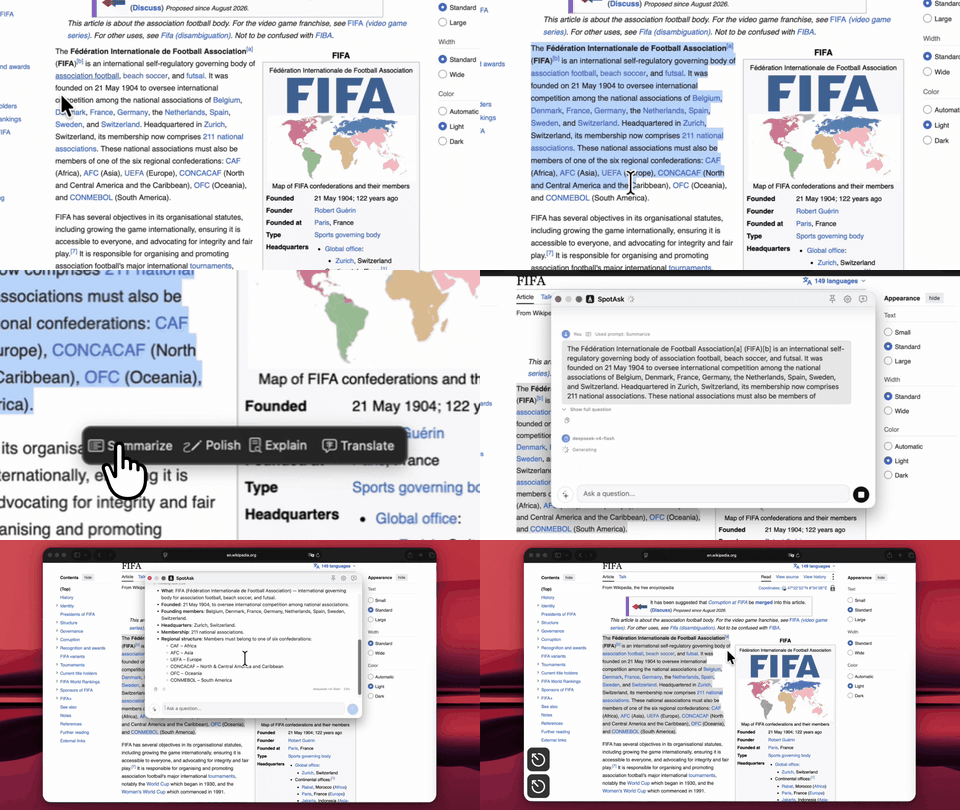 Figure 1: The Selection Assistant displays quick actions adjacent to highlighted text.
Verified Boundaries & Data Handling
- Model Endpoints & Data Handling: When processing text, requests are dispatched to the API endpoint configured in your Services settings. For remote providers, data handling follows their respective published policies; when paired with local models via Ollama, processing remains on-device.
- Accessibility Authorization: macOS requires Accessibility permission to compute the screen coordinates of highlighted text. If revoked, selection tracking cannot locate text.
- Custom Canvas & Password Fields: Views using custom-drawn canvas elements without accessible text nodes may not report coordinates; system password fields are protected by macOS and the assistant does not intervene.
Download SpotAsk
Download the latest DMG from GitHub Releases (Apple Silicon and Intel supported), or install via Homebrew:
sh
brew tap shiquda/spotask https://github.com/shiquda/SpotAsk
brew install --cask shiquda/spotask/spotask
Related Guides
- Selection Assistant Guide — Trigger modes and shortcut setup.
- Prompts Configuration Guide — Build custom prompt templates.
- macOS AI Launcher — Hotkey summoning for quick questions.
- Zero-Telemetry Privacy Architecture — Data destinations and storage design.