SpotAsk vs Raycast AI
A full launcher with paid AI, or a lightweight, free, direct-BYOK ask box for Mac?
The short answer
If you are looking for an all-in-one launcher to search local files, launch applications, manage windows, and browse clipboard history, you want a full desktop launcher like Raycast. SpotAsk does not replace a launcher: it is engineered specifically for the sub-intent of summoning AI from a global hotkey (⌥ Space) using your own API keys or local models, with zero subscription fees and auditable open-source code.
The common decision moment comes down to this: if you already rely on a launcher like Raycast for daily navigation, is it worth paying an ongoing $10 to $50 monthly subscription just to unlock AI inside that command bar, or is it better to keep Raycast for system commands and add SpotAsk as a focused, zero-subscription ask box?
Raycast and SpotAsk differ fundamentally across scope, pricing structure, and network architecture:
- Raycast is a full desktop launcher with AI behind a paywall. Raycast Free covers system commands, but AI requires a paid plan starting at $10/month ($96/year) for 500 monthly credits. Even Bring Your Own Key (BYOK) is a Pro Exclusive feature. When using BYOK with Anthropic, Google, or OpenAI, requests are processed through Raycast's central servers to unify APIs and manage fallbacks; OpenRouter and manual Custom Providers connect directly from your device, while local Ollama models run on-device.
- SpotAsk is a dedicated, free, and open-source ask box built for speed and privacy. There are no monthly software subscriptions, no credit tiers, and no account requirements. SpotAsk connects directly from your Mac to whatever endpoint you configure (or local Ollama/LM Studio), stores credentials in a local
0600file, and provides instant global hotkeys (⌥ Space for questions, ⌥ ⇧ Space for highlighted text) plus one-click hand-offs to browser AI or terminal CLI agents.
The full multi-app breakdown is on the comparison hub. Shortcut coexistence is detailed on the Option+Space guide.
- Choose SpotAsk if you want a fast, focused AI ask box with zero subscription costs, direct BYOK connectivity, and do not need a launcher replacement.
- Choose Raycast if you want a comprehensive desktop launcher, window manager, clipboard history, and extension store, and you are comfortable paying an ongoing subscription for integrated AI.
- Run both if you love Raycast for launching apps (⌘ Space) but want SpotAsk as your lightweight, private AI shortcut (⌥ Space). They can coexist on separate shortcuts.
SpotAsk is our open-source project. We verified Raycast's official documentation and pricing on November 6, 2026. Here is an honest, factual breakdown of where each tool shines.
What each app is for
Raycast: The all-in-one launcher
Raycast is built to replace Spotlight. From a single command bar, you launch applications, search local files, manage windows, browse clipboard history, and install community extensions from the Raycast Store. AI is woven into this command bar, but it is an add-on that requires an active Pro subscription ($10/month to $50/month). A subscription also covers Windows and iOS. Raycast's current Mac app (v2) requires Apple silicon and macOS Tahoe per official release documentation.
SpotAsk: The focused, privacy-first AI ask box
SpotAsk does not try to be an operating system launcher. It deliberately excludes application launching, file indexing, clipboard history, and window management to focus on one job: instant AI access from a hotkey on your Mac.
- Quick entry: Press ⌥ Space, ask your question, get your answer, and dismiss—no launcher navigation or mode-switching needed.
- Contextual actions: Highlight text in any app and press ⌥ ⇧ Space to trigger Selection Assistant for summaries, rewrites, or translations.
- Flexible hand-off: Use External Ask to forward your prompt directly into ChatGPT, Perplexity, or Grok (or custom targets like Claude) or a local terminal CLI agent with a single keypress.
- Direct connectivity & local storage: SpotAsk is 100% free and open source (AGPL-3.0). It requires no login, sends zero telemetry, and connects directly from your Mac to your configured endpoint without passing through an intermediary server.
Prerequisites to install and try each tool
Before trying either tool, check the minimum requirements and prerequisites:
| Requirement | SpotAsk | Raycast AI |
|---|---|---|
| Operating system | macOS 15.0 or later (Sequoia or later) | Current Mac app requires macOS Tahoe |
| Hardware architecture | Apple silicon (arm64) and Intel (x86_64) | Apple silicon only (current Mac app) |
| Installation method | Notarized DMG from GitHub Releases or brew install --cask spotask | Download from raycast.com or Homebrew |
| Account requirement | None. No signup, no login, no email required | Required Raycast user account |
| What you need to get an answer | Either an API key (OpenAI-compatible, Anthropic, Gemini) or local model (Ollama, LM Studio) for in-app answers; or use External Ask for instant browser hand-offs with zero API keys | Active paid subscription (Raycast Pro, Pro+, or Max) to unlock AI credits, BYOK, or Local Models |
| Software license | AGPL-3.0 (auditable, open source) | Proprietary commercial software |
Note on SpotAsk prerequisites: SpotAsk does not require buying a subscription or pre-funding a proprietary account. However, to receive streamed in-app answers via BYOK, you need an active API key from your chosen model provider (or a free local runner like Ollama); SpotAsk does not provide free third-party API tokens. If you do not have an API key, you can still use SpotAsk immediately via External Ask to route questions into free web AI interfaces.
Side-by-side
Checked November 6, 2026. Raycast was not installed on this Mac.
| Feature | SpotAsk | Raycast AI |
|---|---|---|
| Primary focus | Dedicated AI ask box, selection assistant & workflow hand-off | Desktop launcher with AI add-on |
| Pricing | 100% Free & open source (AGPL-3.0). Pay only your provider's API rates (or $0 with local models). | Paid subscription. Free tier has no AI. Pro is $10/mo ($96/yr) for 500 credits. Pro+ $20/mo; Max $50/mo. |
| Account requirement | None. No signup, no account, no tracking. | Required Raycast account. |
| Open source | Yes (AGPL-3.0). Auditable source code. | No (Proprietary). |
| Bring Your Own Key (BYOK) | Free for all users. OpenAI-compatible, Anthropic, Gemini. | Locked behind Pro. Requires paid subscription ($10+/mo) to connect own keys. |
| BYOK routing & privacy | Direct to provider endpoint. Zero middleman servers; keys stored locally with mode 0600. | Processed through Raycast servers for Anthropic, Google, and OpenAI. Direct for OpenRouter and manual Custom Providers (image attachments upload to Raycast). |
| Local models (Ollama / LM Studio) | Free, via local OpenAI-compatible endpoint (Ollama, LM Studio) on your Mac. | Pro Exclusive. Local models (Ollama) require an active paid Pro subscription. |
| External hand-off (Web & CLI) | Built-in (External Ask). One-key pre-fill to ChatGPT, Perplexity, Grok, or terminal CLI agents. | Quicklinks can open search URLs. Extension capabilities vary. |
| Highlighted text actions | Selection Assistant (⌥ ⇧ Space). | AI Commands inside launcher. |
| Scope & boundaries | Dedicated menu bar ask box and text actions (no file search, window management, or launcher features). | Full desktop launcher, file search, clipboard history, window management, and extension store. |
| macOS compatibility | macOS 15 or later (Apple silicon and Intel). | Current Mac app requires Apple silicon and macOS Tahoe. |
| Default hotkeys | ⌥ Space (ask box), ⌥ ⇧ Space (selection). | ⌘ Space on Mac (launcher). |
Where your API key's requests go
The network path and data handling depend heavily on the app and provider you configure.
Raycast AI request routing
Raycast's Bring Your Own Key page explains that when using BYOK with Anthropic, Google, or OpenAI, requests are processed through Raycast servers "in order to unify the model APIs, integrate fallback behaviors, and do some final prompt management."
- OpenRouter exception: Requests made with an OpenRouter API key go directly from your device to OpenRouter servers.
- Custom Providers: Custom Providers send requests directly from your device to the configured endpoint, and keys stay in a local
providers.yamlfile (~/.config/raycast/ai/providers.yaml). Custom Providers are marked Pro Exclusive. In addition, the privacy page notes that image attachments sent to Custom Providers are still uploaded to Raycast servers. - Local Models: Local Models (Ollama) keep conversations on your Mac without sending prompts to Raycast servers, though server tools like image generation run on Raycast servers. Local Models are also Pro Exclusive.
SpotAsk direct-to-provider routing
SpotAsk was architected from day one without intermediate servers:
- Direct connection: Every request travels directly from your Mac to the provider endpoint you specify (OpenAI-compatible, Anthropic Messages API, Google Gemini, or a local server like Ollama or LM Studio).
- No SpotAsk account: There are no user accounts, no login portals, and no analytics capturing your prompts.
- Local 0600 storage: API credentials are saved exclusively in a local file with mode
0600permissions (readable only by your macOS user account), never in shared cloud databases.
For technical architecture details, see BYOK on macOS, Privacy Architecture, and Providers & Models.
Price: Free & open source vs recurring subscription
Raycast Free includes no AI functionality. According to Raycast's billing page, all AI features require an ongoing subscription:
- Raycast Pro: $10/month (or $96/year) for 500 AI credits. Even if you provide your own API key, BYOK remains locked behind this paid plan.
- Raycast Pro+: $20/month (or $192/year) for 3,000 AI credits (includes top-tier models).
- Raycast Max: $50/month (or $480/year) for 7,500 AI credits.
In contrast, SpotAsk has no software subscription, no tiers, and no credit limits:
- 100% Free software: SpotAsk is free to download and use under the AGPL-3.0 open-source license.
- Direct token pricing: You pay only your AI provider directly for the tokens you consume at their standard API rates. SpotAsk charges zero markup.
- Zero cost with local models: If you connect SpotAsk to Ollama or LM Studio running locally on your Mac, your total cost is $0.
- Zero cost with browser hand-offs: Handing off prompts to free web AI interfaces via External Ask requires no API keys and incurs no fees.
Sending a question somewhere else
SpotAsk includes built-in External Ask, a powerful hand-off mechanism. With a single hotkey, you can:
- Pre-fill web AI chats: Open your question directly in web interfaces such as ChatGPT, Perplexity, or Grok (with Claude as a custom entry)—without needing an API key for that provider.
- Dispatch to CLI agents: Pass your prompt directly into terminal CLI workflows (
omp {query},claude {query}) or custom Bash scripts.
Raycast allows opening search URLs via Quicklinks, and community extensions may offer additional integrations. However, SpotAsk provides this web and CLI hand-off out of the box directly from the ask box. Follow the step-by-step guide to reproduce the ChatGPT + CLI hotkey workflow in under a minute.
Using both
You can easily install and use both apps on the same Mac:
- Keep Raycast as your primary system launcher on ⌘ Space for launching apps, file search, and clipboard history.
- Use SpotAsk on ⌥ Space as your dedicated AI ask box, and ⌥ ⇧ Space for the Selection Assistant.
A natural combined workflow: press ⌘ Space in Raycast to find and launch your code editor or project folder; press ⌥ Space in SpotAsk to quickly query documentation or clarify an error without disrupting your workspace.
They can coexist when given different shortcuts. For resolving shortcut conflicts across macOS, see our Option+Space conflict guide and Global shortcut troubleshooting.
Core quick-ask verification (20–30 seconds)
If you already have Raycast for system commands and want to verify whether a dedicated ask box fits your workflow, the core interaction takes only a few seconds to exercise on a configured setup:
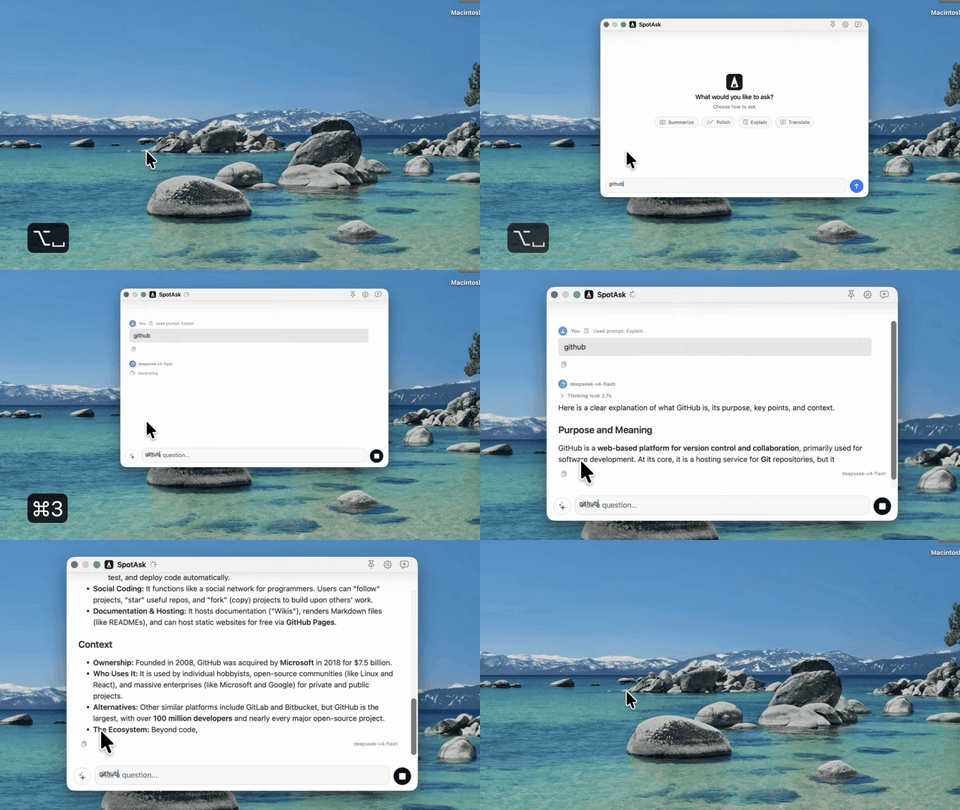 Figure 1: Summoning SpotAsk on macOS with Option+Space, receiving a streamed answer, and dismissing with Escape.
The 3-step verification workflow
- Summon: Press ⌥ Space anywhere on macOS. The floating SpotAsk ask box appears immediately over your active workspace.
- Ask: Type a question (or paste an error snippet) and press
Return. SpotAsk streams the answer directly from your configured provider or local model into the window. See the BYOK first-answer workflow for step-by-step service setup. - Dismiss: Press
Escto instantly close the window and return to your work.
Alternative actions:
- Selected text: Highlight text in any application and press ⌥ ⇧ Space to summarize, translate, or explain it via Selection Assistant.
- Web or CLI hand-off: If a question requires live web search or terminal execution, click an External Ask button or press its shortcut to pre-fill the query into ChatGPT, Perplexity, or a CLI agent via External Ask routing.
Timing & Verification Scope: Once SpotAsk is installed and an API service or local model is configured, triggering ⌥ Space, typing a query, receiving a streamed answer, and dismissing the window takes approximately 20 to 30 seconds of active interaction. This measured interval reflects prompt entry and output reading on an already-configured setup; it does not include initial application installation, API key creation, or local model downloads, and varies with your model provider's network response latency. This is a workflow verification of SpotAsk's core ask experience on macOS 26.7.1 (SpotAsk 0.3.4, build 30), not a comparative speed benchmark against Raycast.
When Raycast is the better choice
Choose Raycast if your primary goal is an all-in-one system launcher:
- You want to launch apps, search files, manage windows, and browse clipboard history from the same bar as AI.
- You want access to the Raycast Store, snippets, and team-shared commands.
- You prefer paying one vendor to manage multiple AI models and credit pools without handling API keys.
- You need a unified launcher that also runs on Windows and iOS.
When SpotAsk is the better choice
Choose SpotAsk if you want a dedicated AI quick-ask box on Mac:
- Fast & focused: You want an instant floating ask box without launcher mode-switching.
- 100% Free & open source: You want full AGPL-3.0 transparency and prefer not to pay a $10–$50/month subscription for hotkey AI.
- Direct BYOK connectivity: You want your requests sent directly to your provider endpoint, without passing through an intermediary server.
- Secure local storage: You want API keys saved locally on your Mac with restrictive
0600permissions and zero account requirements. - Built-in web & CLI hand-offs: You want one-click routing to browser chats (ChatGPT, Perplexity, Grok) or terminal CLI tools via External Ask.
- Universal Mac support: You run on an Intel Mac or prefer an app that supports macOS 15+ across both Apple silicon and Intel hardware (Raycast's current Mac app requires Apple silicon and macOS Tahoe).
If you want a full open-source launcher instead
SpotAsk is intentionally focused on the AI ask experience; it is not designed to replace OS launchers. If you are looking for an open-source alternative to Raycast's launcher capabilities (app launching, window management, system extensions), consider open-source launcher projects such as Sol or Vicinae.
If what you want is the dedicated, private AI hotkey, head over to Getting Started.
How we checked
Checked on November 6, 2026, on a Mac running macOS 26.7.1. SpotAsk 0.3.4 (build 30) was installed and verified. Raycast was not installed on this test machine; no dual-app shortcut conflict test was run on this hardware. Where two apps want the same shortcut, pick one owner or configure distinct hotkeys.
Raycast manual and documentation pages reviewed on November 6, 2026:
- Bring Your Own Key
- Custom Providers
- Privacy & Security
- Billing & Plans
- Local Models
- Keyboard Shortcuts
- Quicklinks
- Pricing
- What's New in v2
SpotAsk documentation sources: Getting Started, Providers & Models, External Ask, BYOK on macOS, and Privacy Architecture. Explore all options on the comparison hub.
FAQ
Is Raycast AI free?
No. Raycast's billing documentation states that AI features are not included in Raycast Free. Raycast Pro starts at $10/month (or $96/year) for 500 monthly AI credits, and Bring Your Own Key (BYOK) is locked behind the paid Pro tier. SpotAsk is 100% free and open source (AGPL-3.0) with zero subscription fees, no credit tiers, and no account requirements; you pay only your model provider directly for token usage, or $0 with local models like Ollama.
Does Raycast BYOK send my key through Raycast's servers?
It depends on the provider path. For Anthropic, Google, and OpenAI, Raycast processes requests through its own servers to unify model APIs and manage fallbacks. OpenRouter BYOK and manual Custom Providers connect directly from your device to the target endpoint, though image attachments sent through Custom Providers are still uploaded to Raycast servers. Local models (Ollama) stay on your machine. SpotAsk connects directly from your Mac to whatever endpoint you configure (or local Ollama/LM Studio), with zero intermediary servers and local credentials stored with mode 0600 permissions.
Can SpotAsk replace Raycast?
SpotAsk replaces only the AI quick-ask and BYOK experience, not a full desktop launcher. If you need application launching, file search, clipboard history, window management, and community extensions, you need a full desktop launcher like Raycast (or open-source alternatives like Sol or Vicinae). If all you want is a fast, private hotkey to ask AI, run Selection Assistant, or hand off prompts to web or CLI models without paying an ongoing subscription, SpotAsk is designed specifically for that sub-intent.
Can I run SpotAsk and Raycast together?
Yes. Use Raycast as your system launcher on Command+Space for launching applications, searching files, and managing windows, and use SpotAsk on Option+Space as your dedicated, private AI ask box. Both apps support configurable hotkeys, allowing them to coexist on separate shortcuts.